
Choose the report format for the next person or tool that needs it.
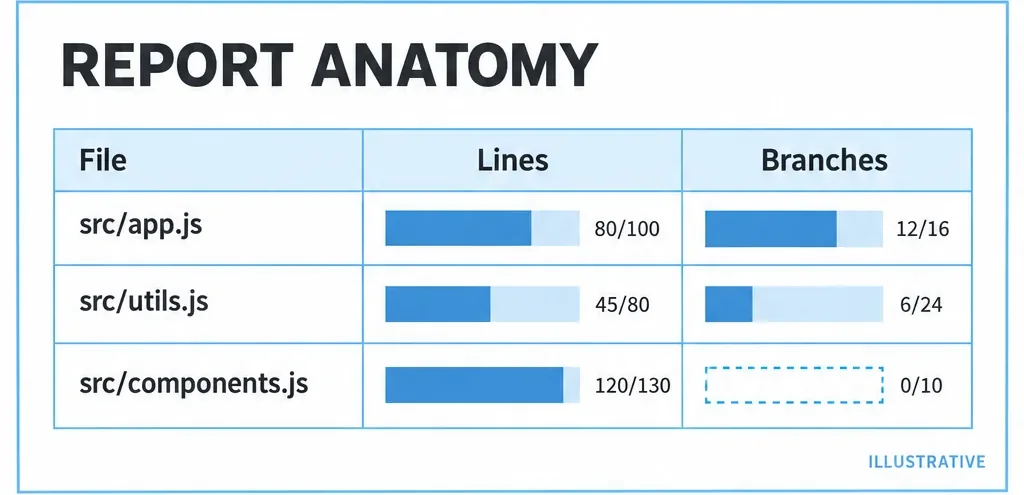
Are you finding a missed branch or feeding a CI integration? Do you need raw counters or totals? Reporters format existing coverage. Switching from text to HTML does not execute another test or expand the measured file scope.
Match output to the job
| Reporter | Use | Usual output |
|---|---|---|
text | Per-file log inspection | Terminal table |
text-summary | Aggregate totals | Terminal summary |
html | Source investigation | coverage/index.html |
lcovonly | LCOV tool input | coverage/lcov.info |
lcov | LCOV plus source browsing | LCOV and HTML |
json | Detailed counters | coverage/coverage-final.json |
json-summary | Totals for scripts | coverage/coverage-summary.json |
A report-dir override changes the base directory. Summary JSON does not contain the individual counters and location maps carried by a detailed coverage object.
Generate or regenerate outputs
For a Mocha setup that nyc already measures correctly:
nyc --reporter=text --reporter=html --reporter=lcovonly mochaIf the raw files remain in .nyc_output, render another format without rerunning tests:
nyc report --reporter=html --reporter=json-summaryKeep the checkout and maps aligned with those files. Rendering old counters against changed source can produce highlights that no longer describe the tested code.
Inspect locations before colors
Select a file with a known untested outcome. Compare statements, functions and branches rather than substituting line coverage for all three. A line can run while an alternative on that line remains untested.
Watermarks control display bands. They are separate from thresholds that make check-coverage fail. Changing a watermark can change a color without changing a counter or CI policy.
Check the downstream paths
Before handing LCOV to another tool, inspect its source-file entries and compare them with that tool's checkout. An output file can exist while its paths are unusable downstream. Choose lcovonly for an LCOV-only integration and keep HTML for human review.
| Problem | Check |
|---|---|
| No report after tests | Collected raw data and selected outputs. |
| No terminal summary | text or text-summary is selected. |
| Source cannot be mapped | Artifact paths and source checkout. |
| Green report; failing gate | Watermarks versus thresholds. |
For custom reporting, continue with coverage maps and library APIs.
Primary sources
Check official documentation against the tools installed in your project. These explanations and examples are independent.